|
|
|
|
| Have Questions? |
Engaging Technologies is dedicated to providing the very best educational technologies to educators in the Midwest. We promise to provide only those products that we would use in our classrooms!
Please contact us with any questions regarding sales, training, or implementation, of our product lines in your classroom or organization.
Call 800.705.4049
Send us an email
Visit our website
The ET Team
- Dustin Frank
- Cathy Frank
- Mandy Vitense
- Linda Peters
- Kerry Kimple
|
|
|
Greetings! 
With the holidays upon us, schools everywhere are filled with the anticipation of the season and a long winter break. This comes along with fun, gifts & treats, lots of family in and out of town and crazy cramming trying to end the semester on track.
As you prepare for the end of your semester, we hope you'll touch base with us on how we can support you with the technology in your classroom. Whether you are building quarterly assessments in your ExamView LAN based system, or accessing holiday themed lessons on MimioConnect, or simply trying a new formative technique with your clickers, we're here to help. We want to give you the gift of learning this holiday season.
Have a glorious winter break and we look forward to even more new and exciting things in 2013! Happy Holidays!
Dustin Frank
Engaging Technologies
|
|
Special Offers
Be sure and visit our special offers page to see all of our special pricing from our product partners.
FREE products from eInstruction through 12/21/12 only! Hurry to take advantage of this great deal.
Livescribe Pro Packs, 8GB, and 4GB pens are Sold Out!
You can still grab 2G Echo smartpens while supplies last!
Click to view all current special offers...
|
|
Company News

New iPad Classes offered in January
Whether you or someone you know wants to become more proficient using their iPad for personal use or in education, we have brand spankin' new iPad classes that will help class attendees to become more than a basic user and learn how to more effectively utilize their iPad to its fullest!
FOR EDUCATORS: Our basic iTeach with Apple iPad 101 course will help you integrate your iPad into all you do with your students. You'll leave with information on being more productive with your iPad and a variety of basic workflow apps, iPad lesson plans, apps to share content easily with parents and students, and how to mirror your computer on the iPad to show students' digital work . . . more details
FOR PERSONAL USE: A gift certificate for our iGot an iPad for Christmas! Now What? class would make a great fit for stay-at-home moms and dads, corporate execs, college students, busy grandparents or anyone who wants to better utilize their iPad. This training, conducted in a focused, fun learning environment . . . more details
|
|
|
|
|

|
|
Product Updates
Workspace for iPad Now Available!
Turn your iPad or Android tablet into a mobile interactive whiteboard with the WorkSpace Connect app. Use your tablet to control your desktop computer, facilitate lessons, annotate over content, and project materials onto any surface, from anywhere in the room.

WorkSpace Connect for your iPad or Android tablet works in conjunction with WorkSpace software installed on your computer, giving you a remote desktop with access to your lessons, content, and tools. (The WorkSpace Connect app requires the complete version of WorkSpace software installed on your desktop computer, or the connection with eInstruction® equipment.)
- Create, assemble, and present interactive multimedia lessons.
 - Incorporate and work with teaching and learning materials in multiple formats from many sources.
- Manage more than 40 annotation, teaching, and learning tools.
- Using WorkSpace Connect and any eInstruction® student device in

the room engages students with multi-user functionality.
And the WorkSpace Connect app makes it easy to use your iPad or Android tablet to control WorkSpace recognition tools that are on your desktop. Now, you can convert handwritten text, numbers, shapes, and equations into printed content, making them more readable for students. Download the new workspace versions HERE!
|
|
Idea Factory
What's New on Tumblr This Month?
Watch & Listen to eInstruction's Formative Assessment Panel Discussion
eInstruction Senior Product Managers, Paul Buckley and Sheila DeJoode, joined Milton Area School District Superintendent, Cathy Groller as panelists for a webinar sponsored by District Administration magazine. In the webinar conducted in October, the panel discussed how frequent and on-going formative assessment, when integrated with instruction, leads to improved teaching practice, as well as marked progress and enhancements in student learning and achievement.
Click HERE to go to the District Administration website and view the slides and hear the audio from the webinar.
User Tip: Mimio
 You definitely won't want to miss out on downloading the Holiday Gallery Pack from MimioConnect! This Holiday Gallery Pack has incredible holiday templates, fun holiday reveals, and some really neat already-made lessons - not too mention lots of holiday clip art!
Save yourself some time and effort with ready-made activities that will give you a headstart on your own customizations!
User Tip: eInstruction
Remember that with the eInstruction's Insight 360 Formative Instruction System, it doesn't matter what format your holiday content is in - Word, PowerPoint, SMART Notebook, Keynote, PDF or more - the CueTag system allows you to make any content pad enable. Any content. Any format. Any time.
If you haven't seen the amazing CueTag system that allows you to make any content pad-enabled, watch this video to learn how to tag a question with Insight 360.
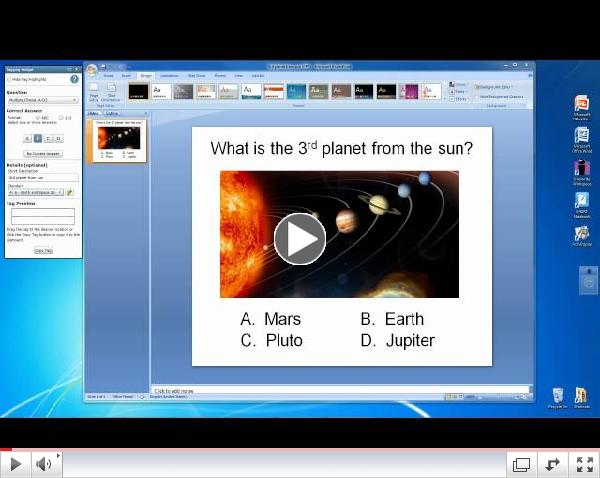 | | Insight 360 - How to tag a question |
|
Grants, Funding & Contests

The eInstruction® Classroom Makeover Contest finalists have been selected and voting ends December 7th! The 15 finalists, selected by a judging panel of education and technology industry leaders, represent the best video entries from the United States and Canada (excluding Quebec). The finalists will be narrowed down to one grand-prize winner per grade level category (K-5, 6-8, and 9-12) based in part on votes the general public submits on the contest site, as well as on Facebook. Public voting will be open through December 7 and grand-prize winners will be announced on December 11.
One of the finalists in the K-5th grade category is Miss. Collins' 3rd grade class from Grand Island, Nebraska. "The kids worked very hard on their video entry and we feel very honored to be selected as a finalist and to represent not only Jefferson Elementary, but also the entire state of Nebraska." said Collins.
The three classroom makeover packages include cutting-edge instructional technology-comprised of eInstruction's Insight 360, Pulse 360, Mobi, and DualBoard, as well as products from sponsors Adaptive Curriculum, Fablevision, InFocus, and Starrmatica. The new technology will transform each winning classroom into an engaging, collaborative environment, allowing instructors to adjust lessons in real time when assessment indicates students require more time with a particular topic.
When asked why technology has been effective in her classroom, Miss Collins said, "My kids are very active and they need to be moving all the time to keep them engaged. They respond when they have a movement to incorporate with a skill they are learning."
Voting ends December 7th!! To support our Nebraska schools, please click on the video below and VOTE for Miss. Collins' 3rd grade class. (Currently their video is in 2nd place and we need lots of votes from Nebraska to help them win.)
"Winning this new technology would allow us to expand on the lessons we teach and allow the students to move things around and interact with what they are learning. Our kids beg to work with the iPad and the Mobi and adding this new technology, specifically a DualBoard would change our entire teaching environment at Jefferson."
|
|
Upcoming Training Opportunities
FREE eInstruction Training Webinars - Live or Recorded

eInstruction hosts a customer webinar every Monday at 3 pm CDT. These webinars last for 20 minutes and cover a specific topic.
- December 3, 3:00 pm CDT - 5 Tips for Using Insight 360
- December 17, 3:00 pm CDT - Workspace 9.0 - What's New
Visit this link to see the schedule and register for upcoming webinars or to view recordings of previously held webinars!
|
|
|




 VIDEO: Great for teaching chemical bonds to animal lovers
