|
 |
Resource Materials & Technology Center:
Deaf/Hard of HearingOutreach Services for the Blind/Visually Impairedand Deaf/Hard of Hearing
207 San Marco Avenue
St. Augustine, Florida 32084
800-356-6731 (FL)
|
|
Free online sign language courses available! The Spring 2016 session begins March 28, 2016. Please see this link for details! Please share with anyone who might be interested!
|
Apple Accessibility: Web Resources and the AccessibilityBy Apple Staff, January 2016 Most people know about the core products offered by Apple-iPhones, iPads, and Macs. Those of us who utilize accessibility features to use these devices may benefit from the vast resources Apple offers, some of which, at least, may not be familiar to many. That Apple develops their products with accessibility in mind is evident by the fact that accessibility features are built directly into all of their products. Their accessibility resources, however, are immense. If you navigate to Apple's Accessibility page, you find radio buttons for overview, vision, hearing, physical and motor skills, and learning and literacy. Choosing one of these radio buttons highlights Apple's accessibility features pertaining to that disability. Additionally, on the same page are links for accessibility features built specifically into OS X, Apple's operating system for the Mac, iOS, the operating system for iPhones and iPads, tvOS, the Apple TV operating system, and Apple Watch accessibility. Apple also provides a special e-mail address for accessibility questions and inquiries, accessibility@apple.com. Finally on their support page, they provide a special number for visually or hearing impaired customers to call for accessibility concerns. If you call 1-877-204-3930, you reach a support specialist who is trained to handle accessibility inquiries and to fix problems with Apple devices from an accessibility perspective.
|
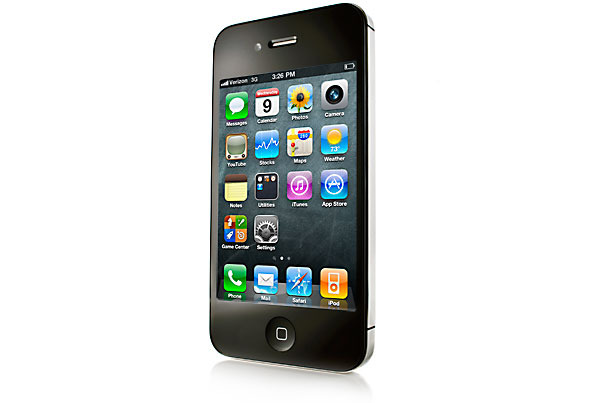
10 Accessibility Tweaks every iPhone User Should LearnBy John Evans, Jan 22, 2016 Note: Students with vision disabilities often use the iPhone to access textbooks and other instructional materials, knowing these short-cuts will provide more efficient use of the tool. Apple's operating systems always offer a range of useful accessibility features, but many of these tools are useful to everybody - here are just a few features I think most iOS users should explore. - Flash
 - Gentler touch
- Better buttons
- Dimmer switch
- A new Home
- Shortcuts
- Larger text
- Reduce Motion
- Invert Colors
- Triple click
Read the complete article and to find out how to use these features.
|
6 Outstanding Augmented Reality Apps for Science TeachersBy Educator Technology Staff, February 2016 Note: Many of the graphics in the augmented apps can be converted to 3D for students with vision impairments. Augmented Reality (AR) technologies are making some huge leaps into the educational landscape transforming the way teaching and learning are taking place. Educators and teachers are increasingly adopting AR technologies in their classrooms. As extensions of the physical world, AR technologies amplify its dimensions and bring life to its static constituents. There are a variety of ways you can use AR in your class. For instance, you can use them to take your students into virtual field trips, visit world museums, animate and enrich textbook content and many more. In an earlier post we featured a number of key apps and websites that teachers can use to engage students in educational AR experiences. Today we are sharing with you some interesting AR apps specifically curated for science teachers. These apps can make science learning more fun, engaging and challenging. - Anatomy 4D: Through this free app and a simple printed image, Anatomy 4D transports anyone who wants to learn about the body into an interactive 4D experience of human anatomy.
- Science AR: Makes the Science AR posters come alive. This App works in conjunction with the Science AR posters. Not in isolation.
- Zoo-AR: Simply download the correct markers and either print them out or view them on another device such as a 3D printer.
- Elements 4D: This app offers a new, fun way to experience augmented reality and learn about real-life chemistry.
- SkyView: Simply point your iPhone, iPad, or iPod at the sky to identify stars, constellations, planets, satellites, and more
- Spacecraft 3D: NASA's (AR) application that lets you learn about and interact with a variety of spacecraft that are used to explore our solar system, study Earth, and observe the universe.
From Educational Technology and Mobile Learning.
|
Sites and Apps!
6+1 Trait Writing - The creators of the 6+1 traits of writing offer a terrific overview of the model on their site, with research to support the program, lesson plans, writing prompts, and rubrics. You can also find writing samples to practice scoring and see how other teachers scored the same piece.
StoryWorks Jr Video Read Aloud: Mountain of Fire - Author Lauren Tarshis reads her article to your class while photographs and footage pull your students into the world of Mount St. Helens. [Closed Captioned]
Note: Visit Scholastic's YouTube channel to find videos with stories, teacher resources, author interviews, etc.
 Pi Day Activities
This blog entry compares various digital storytelling tools (websites and apps). The entry was written in December 2014, so I'm sure there are new tools that aren't covered here. Have you seen any?
Digital Storytelling Apps (Just a Few)
|

Upcoming Events: SAVE THE DATE!
March 2016
April 2016April 7 - #DeafEd Twitter Chat
Time: 7:30 pm EST
Topic: guest host Tamara Samaripa discusses Leadership, Partnership & Role of Deaf professionals
|
|
|
|
|
|