Seven Windows® 7 Calculator Features You May Not Know About The Windows Calculator program has been a part of Windows since version 1.0. What started out as a simple arithmetic calculator has evolved into a far more powerful and diverse tool.You may already know that the Windows 7 version of Calculator  performs basic arithmetic, as well as scientific, programmer, and statistical calculations. What you may not know is that it can also calculate mortgage payments, fuel economy, perform unit conversions, and more. performs basic arithmetic, as well as scientific, programmer, and statistical calculations. What you may not know is that it can also calculate mortgage payments, fuel economy, perform unit conversions, and more.
Here are seven Windows 7 Calculator features you may not know about:
1. Calculate mortgage payments No need to search online for a good mortgage calculator; you've got one built right into Windows. From Calculator, go to View > Worksheets > Mortgage. You can choose from monthly payment, down payment, purchase price, and term (in years).
2. Calculate car lease payments Thinking about leasing a vehicle? Use this worksheet to calculate lease period, lease value, payments, and residual value. Go to View > Worksheets > Vehicle lease
3. Calculate fuel economy The fuel economy worksheet can calculate your vehicle's fuel economy, distance, and fuel used. Go to View > Worksheets > Fuel economy. Click here to read full article. |
Nine Tips For Avoiding E-Mail Snafus
E-mail gaffes can be really embarrassing, especially since most of them can be avoided. We'll share some tips on how to avoid some common mistakes.
If you've ever sent a private e-mail to an unintended party, or forgot to include an attachment in a business e-mail, you're not alone.
Here are nine tips for avoiding common e-mail snafus:
1. Forgetting attachments "I've attached the document for your review." "Oops, no I didn't."  Forgetting attachments is so common that Google's Forgotten Attachment Detector graduated from Google Labs to being a permanent feature in Gmail. The best way to avoid forgetting to include attachments, even if you use Gmail (the forgotten attachment detector is not foolproof), is to attach the file before you begin composing your e-mail. If you wait until you've written your e-mail, your brain may move onto your next task and forget about the attachment. Forgetting attachments is so common that Google's Forgotten Attachment Detector graduated from Google Labs to being a permanent feature in Gmail. The best way to avoid forgetting to include attachments, even if you use Gmail (the forgotten attachment detector is not foolproof), is to attach the file before you begin composing your e-mail. If you wait until you've written your e-mail, your brain may move onto your next task and forget about the attachment.
2. Blind Carbon Copy You're probably used to Cc'ing people to invite collaboration at work. But sometimes, Bcc: is the better option. Use blind carbon copy when you're e-mailing a list of people who have nothing to do with each other. For example, if you send out a newsletter, it's common courtesy to send it to yourself and Bcc: the recipients. People can be protective of their e-mail addresses and don't want them to be advertised to everyone on a mass e-mail list. If you receive an e-mail from a sender who should've used Bcc:, it's possible to suggest the feature without sounding like a jerk. CNET Senior Editor Lori Grunin recommends a gentle reply like, "I don't think you meant to send this to everyone. Did you know you could hide addresses with Bcc: ?".
|
Google: Yep, We're Testing Augmented-Reality Glasses
Google finally acknowledged that it's testing a prototype set of 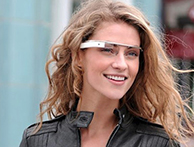 eyeglasses that can stream data to the wearer's eyes in real time. eyeglasses that can stream data to the wearer's eyes in real time.
A video of this augmented-reality experiment was posted by Google on YouTube showing someone wearing the glasses as he made his way around variety of Manhattan venues, receiving up-to-the-minute updates as information streamed into his glasses.
Let's not be too cynical about an idea that, at first blush, seems delightful but not very relevant. Also, given that the authorities take a dim view of driving while texting, you can image how they'll react to someone behind the wheel of a car with yet another distraction.
But this is fun stuff, and if it works as advertised could prove useful to a lot of people. What's more, this isn't a static project. The New York Times reports that one of the researchers on the project, Babak Parviz, is a University of Washington specialist in bionanotechnology who developed a contact lens with embedded electronics that can show pixels to someone's eye. Click here to read full article. |