The End of the Personal Computer ?
 The times they are a'changin. Our twin boys turned 17 in September and now drive to school. I bought a 2015 Accord to replace my old car (2011 Accord), which they now drive. I need to acknowledge the past 4 years of technological innovations. I no longer need a key to open the doors, assuming I have the electronic fob in my pocket; I just put my hand on the door handle and the lock opens up. No key to start either, again, I just push a button and the car starts. There's a camera in the back bumper that displays an image of what it sees on a 3.5 inch screen in the car. The same screen broadcasts a camera view from the right side view mirror each time I signal right. If the car thinks I'm approaching the car in front of me too quickly it flashes lights and beeps a warning. It also has a USB port right in the dash allowing me to play all 32 Gig of my music. From a Flash Drive! Finally, I had to turn off the Lane Departure Warning (LDW) system which tried to beep me to death each time I got too close to the center line(s), and I do that a lot. The times they are a'changin. Our twin boys turned 17 in September and now drive to school. I bought a 2015 Accord to replace my old car (2011 Accord), which they now drive. I need to acknowledge the past 4 years of technological innovations. I no longer need a key to open the doors, assuming I have the electronic fob in my pocket; I just put my hand on the door handle and the lock opens up. No key to start either, again, I just push a button and the car starts. There's a camera in the back bumper that displays an image of what it sees on a 3.5 inch screen in the car. The same screen broadcasts a camera view from the right side view mirror each time I signal right. If the car thinks I'm approaching the car in front of me too quickly it flashes lights and beeps a warning. It also has a USB port right in the dash allowing me to play all 32 Gig of my music. From a Flash Drive! Finally, I had to turn off the Lane Departure Warning (LDW) system which tried to beep me to death each time I got too close to the center line(s), and I do that a lot.
This is just the middle of a never ending process. I recently bought a device to convert the family VHS tapes to DVD, another to turn my vinyl records into music my computer can store, play and make into CDs. I now use an IPod or phone when I exercise. I no longer use the CD players in the house or even the one in my new car. I can't imagine that the 2020 auto models will even include a CD player.
I take pictures of everything with my phone. If I need to copy a password from your router to put into your phone, laptop or tablet, I don't write it down anymore, I take a picture. Remember the Photomat? You dropped your weekend pictures, rolls of film, off at the kiosk on a Monday and 24 to 48 hours later you got back your beautiful 4 x 6 glossies or matte finished photos. BTW, the remnants of one of those kiosks still remain at the A&P shopping strip on Route 100 off 133.
So what the point here? Well, if you're picking up email, browsing the web or drafting a simple note, then your next computer should be a tablet (IPad, Samsung Note or similar device) or even a smart phone. It takes up less space and you can use it in any room in the house or in any wifi enabled space at any time. For phones or 4G enabled tablets you're good to go anywhere there's a cell tower. Say goodbye to the home computer.
Now, enough of us are using that personal computer for much more than the plain and simple, which hopefully will keep me working for a while longer. We're doing bookkeeping, connecting to office work space and a variety of other tasks that require more computing power. Of course for businesses wherein the demand for computing power is not being diminished the computer will be a forever tool.
|
The Future of The Mobile Device
 The future is actually here today. Want to do a little word processing? You can; Microsoft offers its' word processing tool (MS Word) and its' spreadsheet maker (MS Excel) for free for Apple or Android tablets and phones. Marry these tools with one of the many free cloud storage (read next article) accounts and you can store documents, spreadsheets, pictures and more in the cloud and pick them up on any internet connected device.
All the printers manufactured today that connect to your home Wi-Fi or wired network will let you print from pretty much any handheld device. IPad and IPhone print as of right to all the major printer brands. Android phones and tablets requires additional software that is free and readily available from the printer manufacturer, usually through Google's Play Store. Get it here for Canon, Lexmark and HP printers. BTW, HP offers free software that will route anything you print back to your home network connected HP printer, even if you're in Timbuktu at the time.
|
Storing Your Stuff in the Cloud
 Storing pictures, documents and even music in the cloud allows you to access all that good stuff anywhere on any device with an active internet connection. This is especially useful for phones and tablets with little internal storage and without integrated USB connectivity. Additionally, even computer driven environments can protect themselves against losing precious memories, pictures and documents, to not only hard drive failures but to unexpected tragedies, such as fires or floods, that rob of us of everything including local backups. Dropbox offers 2 Gig of storage for free, but with a little finagling you can get up to 23 Gig from them. ICloud gives you 5 Gig for free and with the release of IOS 9, the newest operating system for IPad and IPhone, this cloud account acts more like the portable drive that Apple's competitors have been providing. Google Drive, gives you a whopping 15 Gig for free. Lastly, not to be outdone, Microsoft is also offering the same 15 Gig for free. 15 Gig of storage equivocates to a lifetime of photos for most of us. There's no reason not to sign up for all four. All of these cloud storage accounts are based upon your email address and a password. Icloud accounts require you to have a registered Apple ID which is any email address and a password that you configure through ITunes. Microsoft looks for a sign in at their mail-site with one of their many available email addresses. Google, host not only to Gmail but also by arrangement, to multiple company email addresses, also provides Google Drive with any address meeting their criteria. Here are some helpful links: Dropbox for Android Dropbox for IOS Google Drive for IOS Microsoft OneDrive
|
Windows 10 Update
 Windows 10 opened to mixed reviews. For those whose computers run Windows 8.0 or 8.1, it's a great thing. Microsoft has put back the missing start button, sort of, and navigation is a bit simpler. For those of you on Windows 7, not so much. What was simple on 7, is difficult to find and emulate in 10. I have had to "roll" several clients back to 7 for a number of different hardware and software incompatibilities, as well as client resistance to the learning curve. In one instance, a Dell desktop, could not get on the internet, the network adapter had no driver. Some clients are inadvertently being upgraded to 10, but you can avoid the upgrade by saying no to the prompt. If you want to avoid the issue entirely, reference the summer newsletter for directions on precluding inadvertent installation of 10. You can uninstall Windows 10 within the first month without issue: - On the Start menu select Settings.
- In Settings, select System > Apps & features.
- Select Update and Security.
- Look for the links to restore Windows 7.
- Follow the directions on the screen.
The uninstall does go smoothly about 98% of the time, but I have had to manually fix three machines in the last month that did not revert properly. If you need more help or are reluctant to try the reversal on your own, call for an appointment.
|
Of Interest
 BMW has announced the release of an integrated version of the EnLighten IOS application that combines GPS speed information with location data to anticipate when an upcoming traffic light will change. If you're driving a new BMW with integrated Navigation, you've got it now. Got another car? Get the app here. 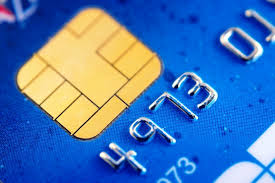 EMV? Euro Master Card Visa. New cards are being issued or have been issued for most of us who have Visa and/or Master Card. Notice the chip, which effective with the printing of this newsletter, changes the way we use our credit card and the issuing bank's liability for cloned cards. From here on in, you should be inserting the credit card in a new type of reader instead of sliding it. Then expect to wait a little longer for a credit card transaction to complete as the mechanism in the machine validates the data on the chip. The current technology is to provide a dual type of card reader that can take a slide to read the magnetic stripe or an insert to read the chip.
What's the difference? If you insert and the card turns out to be stolen or cloned, then the bank will continue to be responsible for the funds due the merchant. If you slide, then the merchant is responsible and will not receive reimbursement. You are still covered as you were before, with most banks, for a lost or stolen card as long as you report it timely.
Merchants are required to not only switch over to the new equipment, which is costly, but also to provide a PCI compliant firewall so as to stop data from being gleaned through an unsecure connection. In other words the firewall needs to stop someone from tapping into the data that is being transmitted from the merchant to the credit card clearing house.
Some merchants, like the local deli where the transactions are small, representing a sandwich and soda or a similar costed item, at present, in weighing the cost of paying for credit card fraud against the cost of purchasing the new machines and becoming PCI compliant, have opted to bear the cost of any loss themselves. I assume as the cost of the machines come down, and guys like me get around to help them, that will change. Read about it. 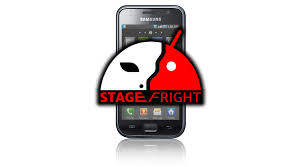 There's a new Android based cell phone virus in town and its name is Stage Fright. The virus is nasty and 95% of Android Cell Phones are susceptible. All the sender has to know is your cell phone number and to send you a multimedia message. Protect yourself by turning off the automatic download of multimedia messages. Here's the story and some help in getting yourself protected. There's a new Android based cell phone virus in town and its name is Stage Fright. The virus is nasty and 95% of Android Cell Phones are susceptible. All the sender has to know is your cell phone number and to send you a multimedia message. Protect yourself by turning off the automatic download of multimedia messages. Here's the story and some help in getting yourself protected.
|
At Raise.com you can buy gift cards at slightly discounted prices. You can also sell cards that you don't want. Raise is the middleman so expect to lose on the trade. Camelcamelcamel.com tracks potential purchases for you at Amazon and alerts you to price drops. Amazon will even refund price differences to you if within 7 days of purchase.
The deals at Kinja.com are great but short lived so hop on over early and often. Techbargains.com also provides great deals on a "get them while their hot and still in stock basis", but limits its merchandise to electronics. The site also hosts a slew of coupons that are current, providing discounts from computer and other technology manufactures that sell directly through the web, like Dell, Lenovo and HP.
|
If you're an "Angie's List" subscriber, would you add me to their list of favored service providers. Thanx.
|
I make DVD, BluRay, Chromecast and Roku connections for that Netflix account or to watch web content on your TV.
I also connect your Homelink and your garage door.
|
|