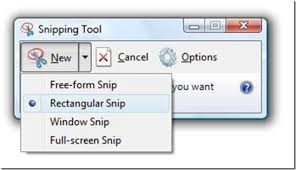
 What is a screen shot, What is a screen shot,
and why should I know how to take one?
Last week I came across this article, declaring that the screen shot is the most important thing on the internet. That might be a bit of hyperbole, but it got me to thinking - I use screen shots, and so do most kids these days, but enough people are unfamiliar with them to make them a good topic for this month's newsletter.
A screen shot is quite simply a picture of what you see on your screen at any moment in time. Why would you want to do that? Perhaps your PC is having an intermittent problem you find difficult to describe. Take a picture of it to show me. Or perhaps you saw a great sale price on something, and you're afraid you won't find it again. Take a picture of it and you can come back to it later. Kids use screen shots all the time to save copies of text conversations - that can be a good or bad thing, but surely you should know how to do that as well! You can screenshot a web page, an article, a recipe - anything you want to keep a copy of that might be difficult to print.
Screen shots are easy to take and you don't need any special software - almost all computers, cell phones, and tablets come with the capability build in. Click on each link for instructions on taking a screenshot with a Windows system, a Mac, or an iPhone, iPad, or Android device. Practice a bit until you feel comfortable with the process, then you will be ready when something interesting comes along and you want to grab a picture of it! |
 I'm getting a ton of spam - does that mean I have a virus?? I'm getting a ton of spam - does that mean I have a virus??
I get this question all the time, and the answer is, almost invariably, a resounding no. Incoming spam doesn't mean you have a virus at all - it means your email address has been harvested somehow, and sold on a list to spammers. The good news is that there is nothing wrong with your computer. The bad news is that there isn't much you can do about it.
Spam management is like a game of cat and mouse. Almost all email providers have built in spam filters that are supposed to stop the spam from getting to your inbox. At the same time, the spammers are doing everything they can to get through the filters. So if it seems that you get little or no spam for a while, then you are deluged with a ton of it, then it peters off again - well you are right, that's how it works. And that part is out of your control.
So, what can you do to limit the amount of spam you get? Here are my suggestions:
- Use multiple email addresses for different purposes. Your "real" address should be limited to close friends and family, your financial institutions, and anybody who's email you really want to read. Use a secondary account for shopping at legitimate sites - you might want to read about their specials, but you don't necessarily want them to clutter up your inbox. And that way if their account database gets stolen the spam won't end up in your main inbox.
- Create a "burner" account - a short-term, unidentifiable email address you don't mind shutting down. Use it for sites you don't trust, one-time shopping, places that require you to give an email address to register, etc
- Don't post your email address anywhere on the web - there are robots that crawl the web harvesting email address to add to spam lists
- Mark spam as spam in your inbox, but be judicious. There's a difference between spam and email from legitimate sites that you simply don't want. Use the unsubscribe button for the latter type of email.
- If you really don't want to give out your email address to a site that requires it, use a temporary email address from a site such as 10 minute mail. These services create an email good for only a few minutes - enough time to "verify your account" in an anonymous fashion!
|
 Spring Cleaning - Get the dust out of your computer!
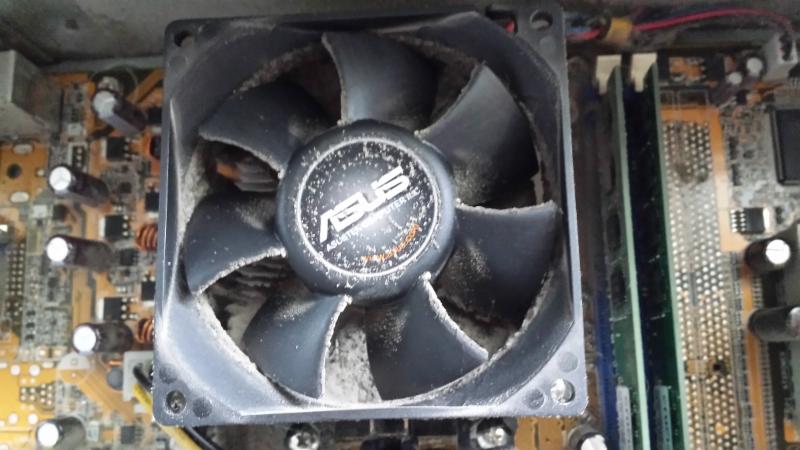
The other day I was working on a computer and my client mentioned that it sometimes sounded like an airplane about to take off. I knew exactly what the problem was - a dust clogged fan. As a matter of fact, this is a picture of that exact fan!
I posted this article in my second-ever newsletter, but the information in it is still relevant, so here goes.
I don't care how clean your house is, your computer is full of dust, and it's killing the poor thing. You would be positively appalled if you knew what I see when I open them up - so get proactive right now!
Here's what you need to do. March down to your office supply store and pick up a can of compressed air. Choose a nice bright sunny day, disconnect your computer, take it outside and open up the case. Don't be scared, that part is easier than you think, there are just a couple of screws or a push button latch, you can do it! After you get the case open, spray the inside with compressed air until the dust stops flying.
Laptops are more problematic as it's not nearly as easy to get into the case. Make sure you unplug your laptop and remove the battery first. If your system has a removable bottom take that off, otherwise just blow compressed air through all the vents. You can damage the fan by forcing it to spin too fast, so hold the blades in place temporarily with a paper clip or toothpick to stop the fan from spinning while you are blowing the dust out. Your computer will thank you!
|

