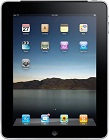
With much fanfare, Apple has now unveiled its 'iPad' computer. Weighing 1.5 pounds and being 0.5 inch thin, it delivers a 9.7 inch touch screen without the bulk of a traditional laptop. Opinions about the device range greatly from 'revolutionary' to 'an oversized iPod Touch'. Computer Troubleshooters has scoured the reviews to bring you the facts about the Apple iPad and what you need to know before purchasing one.
1. Battery Life - The iPad will run for up to 10 hours on battery power. This is better than most laptops, but significantly less than electronic book readers like Amazon's Kindle. This may mean you need to charge your iPad every night if you're away from a power source all day. Don't leave home overnight without your power cable.
2. Touch Screen - The familiar touch screen of the iPhone has been improved to suit this larger device and allow more precise control of the select, scroll, drag, pinch and expand movements of your fingers. The iPad also supports portrait and landscape auto-rotation viewing of compatible software.
3. Accessories - From productivity enhancements to just plain fun, extra gadgets can be found for your iPad. Serious considerations include a keyboard dock or a wireless keyboard, as an alternative to the on-screen touch keyboard. More light-hearted options include a plastic steering wheel frame for driving games.
4. Connectivity - The iPad supports today's fastest wireless network connections. You'll pay extra for a 3G version, which adds data capability across the mobile or cellular phone network. Note, this won't let you make phone calls from your iPad.
5. Apple software - Out of the box, you get 12 Apple software titles including iPhoto, iTunes and iBooks. iBooks is your virtual bookshelf and reader for electronic books. You can also purchase the iWorks applications for word processing, spreadsheets and presentations.
6. Other software - Like the iPod and iPhone, you'll have easy access to over 140,000 software titles currently available from the App Store. Whilst these are not yet fined-tuned for the iPad, Apple has released a kit to software makers so watch out for iPad-optimized programs soon.
7. Internet browsing - Apple's Safari web browsing software is pre-installed, but it doesn't support Adobe's Flash software. Flash is used for animations on some websites (though it's less popular now), so if you rely on web-based functions check if you need Flash or not.
8. Multi-tasking - Like the iPhone, the iPad limits you to using one application at a time. As an example, you can't play music whilst visiting websites.
9. Media - Apple will tell you the iPad is the best way to experience photos, video and more. It certainly could replace the laptops carried by sales professionals for their presentations and provide easy, lightweight storage of service manuals for tradespeople.
10. Camera - One important omission is a camera, especially for this generation that is used to uploading photos and videos to social networking sites. The rumours say there is a cut-out in the plastic bezel for one, so maybe it will be introduced in a later version of the device?
Whilst the iPad's design and features may sound great, any technology has to match your needs and how you work. So, whether you're looking to purchase a notebook, netbook or iPad, talk to your local Computer Troubleshooters to ensure you're getting the best tool for the job.