|
New Portable Devices
|
 |
In order to accomplish paperless office environment goals,
changes in the computer hardware you use may also be to your advantage. A
laptop for use in the patient room at your office or in an outside environment
such as a clinic, hospital, or patient home environment is becoming very
common.
The only thing necessary to access your Futura software, in
most cases, is a valid internet connection so that you may connect to your
database. This remains the case whether
your server is located at your office location or if you utilize the ASP
hosting service Futura offers.
Many computer manufacturers have introduced smaller,
lightweight laptops into the market over the last few years. These devices weigh in anywhere from 2.2 to
just under 5 pounds each. As technology
continues to advance, items can be found at reasonable prices. Hewlett-Packard has just introduced a 12.1"
touch screen laptop with a rotatable screen to allow use as a tablet.
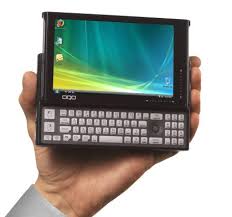
Another new item recently introduced onto the market is an
ultra mobile PC from OQO. This fully
functioning Windows Vista platform PC is housed within a small package that has
a 5" display with touch-screen capability and a slide-out Qwerty keyboard. All this, and it can slide into the pocket
of your labcoat.
The bottom line is that there are many
computer hardware options available that no longer require cables running from
your office wall. So unchain yourself
from your desk chair and take advantage of the freedom!
|
VISIT FUTURA AT
UPCOMING EVENTS
|
 |
|
AOPA National Assembly
Seattle, WA
Sept. 20-23, 2009
Georgia Society of Orthotists and Prosthetists
Atlanta, GA
Oct. 8-10, 2009
New England Chapter AAOP
Manchester, NH
Oct. 14-16, 2009
North Carolina Chapter AAOP
Charlotte, NC
Oct. 29-31, 2009
New Jersey Chapter AAOP
Atlantic City, NJ
Nov. 11-13, 2009
|
|
Contact Us |
|
Phone:
(727) 791-3332
Fax:
(727) 726-7164
Email:
support@futuraintl.com
Internet:
www.futuraintl.com
|
|
|
Still Handwriting Your Clinical Notes?
If you answered "Yes" to this, then
you might not be using the Futura software to your best advantage.
One of the first steps that any
facility can take to improve their clinical documentation process would be to
stop wasting precious time and money by continuing to maintain paper patient
charts with handwritten clinical notes by practitioners. By implementing a plan to transition to
electronic notes, a feature already available within the Futura software, your
office could experience the following:
-
No more wasted staff time
"Chart Chasing"
-
Eliminate issues with
illegible handwriting completely
- Improved staff time
management
- Improved documentation
detail and thoroughness
- Recall of information available at your fingertips
-
Improved protection and
security for patient Protected Healthcare Information
-
Eliminate outside
transcription expenses by using voice recognition software with Futura
Available options for notes in
Futura include:
-
Create clinical notes
using the Notepad section on the Patient master file
-
Create clinical notes
using Patient Forms to attach to the Patient master file
-
Create customized Automated
Notes templates for repetitive common wording for notes
-
Dragon Naturally Speaking
voice recognition software can be integrated for use with Futura at no charge.
(Separate purchase of Dragon required.)
|
Continuing Education-Not Just For The Lab
Where would your business be if you still only made
prosthetic sockets out of wood?
Most people would agree that wood sockets are outdated in
today's world and the thought of making one is laughable. However, at the same time, many offices are
still using paper processes that were in place when the lab was out back in the
wood carving shop.
New fabrication components and technology have been
integrated into facilities for improved function and business profitability
over the years. Isn't it time that the
administrative side of doing business changes with the times as well?
Some
areas within an office to consider updating continue to include working towards
transitioning to a paperless environment by taking advantage of improved
software and hardware technological advances.

Moving towards an Electronic Medical Record (EMR) instead of a paper
chart for each of your patients can easily be accomplished within the Futura
software. Any type of paper document
currently being filed in a patient chart could easily be converted into an
electronic image. Common items which
could be scanned into the Images section of a Patient master file include
patient insurance cards, patient identification, component warranty cards,
correspondence, and prescriptions.
The Images section can also support digital photos as part of the
EMR. Consider the cost savings in
printer toner alone if you have been printing out color photos to be filed in a
paper chart. Not to mention unnecessary
personnel time and expense. And, again,
these images can then be accessed by any staff member for either clinical
review or possibly as medical justification documentation to be submitted to an
insurance carrier in support of a medical claim.
Just as you would expect clinical staff to remain current in
their CEU credits, don't put off having them learn new skills at their desk
with the computer either. Whether the
hesitation is because of intimidation or lack of time, these skills are
becoming increasingly vital in today's medical world.
The real benefits to be seen will include reducing personnel
time to comply with the increased administrative and documentation requirements
placed upon the industry over the years.
Could your facility benefit from freeing time up for staff to provide
more billable services? Think of this
instead of seeing people run to the First Aid kit for a bandage for yet another
paper cut. |
Did You Know ?
 This month, we would like to
remind all of our clients that it is an option to have your company logo
integrated into the Futura software to allow it to be generated on several
different print documents. Most
commonly, logos have been integrated into Invoices, Insurance Invoices,
Statements, and Prescriptions for clients.
Logos may be added to the
standard documents mentioned above, but it is also possible for our Technical
Support team to add them to Merge Files.
The use of Merge Files will allow more customization options for
document layouts, which can enhance the overall look of any form or
correspondence generated by your staff.
It will be necessary for
logo artwork to be submitted in a .bmp format to allow our team to assist with
your request. We also ask that any text
you wish to use for a custom Merge File be forwarded to our team via email to support@futuraintl.com as we cannot
create these items from a faxed document.
There is no charge for our
team to assist you with either of these options. In fact, making these changes could easily reduce custom
printing expenses for your facility.  |
A New Voice On The Line
Paul, a native southern
Californian, moved to Florida in 2 002 by way of Baltimore, Maryland.
Paul is probably best known for his height (6'4"), tattoos, sense of humor, and
for his seemingly innate ability to work with and fix computers. He's an
avid movie and music fan owning an extensive and eclectic music
collection from all points of the musical spectrum. 002 by way of Baltimore, Maryland.
Paul is probably best known for his height (6'4"), tattoos, sense of humor, and
for his seemingly innate ability to work with and fix computers. He's an
avid movie and music fan owning an extensive and eclectic music
collection from all points of the musical spectrum.
Over the years, he has held
a wide variety of jobs including a position as an office and industrial
mover that allowed him to visit several interesting spots in and around
the Washington, D.C. area (including the pentagon just after 9/11) to a
dispatcher for a tree farm.
In recent years, he has
focused on technical support with imbedded and proprietary software
systems. Paul really feels at home working with the Futura staff, and
enjoys helping our clients' experience with the Futura system easier
and more productive.
|
Proud Members
|

|
|
|
|
|