|
Photo Tip
Photo Tip: Getting your colors right (Part 1)
May 2010 |
| |
|
Not all light is the same, different light sources have different "color temperatures". Even daylight at different times of the day and under different weather conditions can have different color temperatures. While our brain compensates for these color differences, camera sensors and film do not. If the color temperature of the light is not accounted for when you are taking a picture, a mismatch can result in a color "cast" in the image. Have you ever had pictures shot indoors that looked overly yellow or orange -- that's an undesirable color cast at work.
Fortunately, digital cameras allow us to make adjustments for the color temperature of light by adjusting the camera's "white balance" to match the light source. Typical settings are sunny, cloudy, shade, incandescent, flash, etc. If you are photographing nature, a slightly off white balance may not be noticeable, but it can be very noticeable on skin tones when you are photographing people. Also, things can get a bit more complicated when you have multiple light sources at play (e.g. incandescent and window light, or a room lit by fluorescent and incandescent lights). So what do you do in these situations? Auto White Balance? - Probably not! My favorite tool for the job is the X-Rite ColorChecker Passport.
 I take a shot with the ColorChecker in the scene in the same light as my subject. Once this shot is taken I can remove the ColorChecker and proceed with the shoot. Once the images are loaded onto the computer I pull up the image with the ColorChecker in it and using the eye dropper tool set the correct white balance by clicking on the second from the left gray scale patch shown on the bottom of the chart in the picture on the left (think white with texture patch). Immediately any color casts are eliminated from the picture. I can then synch this white balance setting across all the pictures from the shoot and BAM, white balance is done, it's that easy! If I want to warm up or cool down the scene in a natural looking way, I can use the patches in the top part of the passport. This tool is a real life saver when you are photographing people, products, or in mixed lighting situations, and it's small enough for you to put in your camera bag and always have on hand.
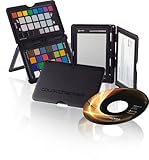
X-Rite ColorChecker Passport
by X-Rite
Electronics 
List Price: $99.00
Our Price: $98.00 Buy Now |




